Note processing and synchronization architecture
SpareThought uses native handwriting rendering and database-only synchronization for journals, meeting notebooks and ToDo handwriting. This document explains how notes are opened, displayed, edited, saved locally and synchronized across devices.
Known recovery and acquisition defects are listed under Known implementation gaps and evidence boundaries. Describing an intended invariant does not mean every edge case already satisfies it. Implementation and device-verification evidence is recorded in the validation reports.
1. System boundaries and ownership
The app owns the editable working copy and local durability. g-paper owns native pen input, brush geometry and drawing. The server owns canonical account content, conflict retention and replay fences. PowerSync delivers server changes to each account’s local replica; the app’s upload owners send bounded mutations through the authenticated API.

| Owner | Main implementation | Responsibility |
|---|---|---|
Account lifetime |
|
Account-separated storage, generation checks, process-owned saves and sync jobs; settle admitted work before switching accounts. |
Editor |
|
Native view integration, page-coordinate strokes, edit grouping, selection and bounded undo/redo. ToDo drafts have an explicit Save/Cancel boundary. |
Local durability |
|
Freeze save generations, prepare changed content outside transactions, commit working state and durable intents atomically, acknowledge only completed writes. |
Binary content |
|
Metadata headers, exact samples, immutable frames, stroke revisions and ordering. |
Upload scheduling |
|
Capture trigger-authorized snapshots, acquire bounded work, preserve retries, apply acknowledgments and wait for canonical confirmation. |
Download and application |
|
Verify bounded incoming references and frames, then project complete content without replacing protected local edits or active drafts. |
Server |
|
Validate authorization and dependencies, commit each operation with its outcome, retain conflicts, retire acknowledged results and reclaim unowned content. |
There are two local representations to distinguish: PowerSync’s downloaded server rows and the app’s working tables. Incoming server data does not directly become visible ink. Verification and projection mediate that transition. The local working copy can legitimately be ahead of, or in conflict with, the server.
1.1. Account and execution boundaries
Each activation captures an account/generation stamp. The account coordinator holds its short publication lock to admit work and increment an in-flight count, then releases it before database work. A switch closes admission and waits for already-admitted transactions to drain before rebinding the workspace. This keeps ordinary editing checks from waiting behind database or JSON work while preventing an old account’s result from publishing into a new workspace.
Save jobs belong to the workspace’s process scope, not a disposable Activity. Caller cancellation does not cancel an already-owned durable save acknowledgment. This ownership ends with the process: process death can still lose edits newer than the last completed transaction. Restart reconstructs from storage, not from a promise that an in-memory coroutine would eventually finish.
The supported installation starts with the current schema: page and ToDo metadata use wire version 2, with editable samples stored in binary ink rows. There is no inline-JSON reader, automatic conversion, or mixed-client compatibility path. Notebook and settings wire version 1 and binary codec version 1 remain current formats; their version numbers do not imply legacy support. See ADR-005.
2. What a note contains
A notebook carries context, page identities, paper settings and metadata. A page has independently addressed strokes. A ToDo may also own an ink container, using the same stroke protocol. Viewport, zoom and device calendar identifiers remain local; they are not additional replicated note content.

| Record | Meaning |
|---|---|
Metadata |
Notebook/page/ToDo identity, relationship, settings and tombstone state.
Wire version-2 page/ToDo metadata has no stroke arrays. Local page JSON uses an
|
Stroke head |
Stable stroke/container identity, current revision or deletion, immutable predecessor and order clock, plus the server’s compare-and-swap revision. |
Revision |
An immutable stroke candidate: style, color, exact width bits, total sample count, part count and reference-chain digest. |
Reference |
One ordinal’s chunk hash, part, offset and count. References are rows; there is no growing page-wide list of all sample bytes in one upload record. |
Chunk/frame |
Immutable encoded bytes, addressed by SHA-256 of those exact bytes. Short strokes can share a frame; a long stroke can span many frames. |
Retained owner |
Current heads, pending transfers, trigger authorizations, conflicts and supported copy/recovery state keep their required revisions alive. Removing one owner does not authorize deleting bytes still needed by another. |
2.1. Exact binary representation
The chosen frame is SPIN version 1 with a 20-byte header and a decoded body of
at most 65,536 bytes. Its maximum stored frame size is 65,556 bytes. It stores
little-endian sample columns: x, y, pressure, tilt and azimuth as exact float32
bits, followed by signed int64 timestamps. Identity, brush, color and width remain
editable data. No point reduction, rounding or bitmap substitution is enabled.
Deflate level 1 compresses the body when it makes it smaller; otherwise the body is raw. CRC32 checks decoded corruption; SHA-256 binds the immutable stored frame. Different runtimes need not produce identical compressed bytes for equal samples, so a retry uses the bytes already persisted rather than recompressing its candidate.
Server payloads live in PostgreSQL bytea; local working payloads use SQLite
BLOBs. Base64 is used at the JSON/PowerSync text boundary, expanding a maximum frame
to 87,408 characters before surrounding JSON. Note content requires no S3-style
object store. The development stack’s other storage services do not change this
note-content boundary.
The codec is bounded independently of an entire stroke. A decoder does not allocate the declared total sample count just because a frame claims it. Reference-chain verification checks contiguous offsets, matching metadata and final digest before a revision becomes complete. Missing parts remain incomplete, never a valid shorter stroke or an empty page.
2.2. Drawing order and edit identity
Each stroke has a predecessor, a logical clock and an installation identity. Children of a predecessor sort deterministically by descending clock, installation ID and stroke ID, then project through an iterative traversal. This preserves concurrent additions without rewriting a page-wide order array. Deleted nodes remain anchors for surviving descendants. Transforming a stroke changes its sample revision, not its order identity.
The conflict unit is a stroke, not a compressed frame. Two devices can add distinct strokes even if their samples eventually share storage. Incompatible changes to the same head use its expected server revision and retain a losing candidate for review instead of silently choosing by wall-clock timestamp.
3. Opening and displaying a note
-
A journal date or meeting entry resolves the notebook identity in the current account. Merely viewing an untouched blank date does not need to create a saved note.
-
The ordinary editor open path reads notebook and page headers. A nonempty unloaded page carries
PageInk.Stored(count): that is a residency handle, not an empty page. -
The selected page is loaded with a notebook-revision check.
InkStoragereads bounded frames, verifies their references and assembles exact strokes in logical order. -
NotebookSessionadopts the loaded page; other page payloads can stay in storage. Saved inactive samples may be released. Dirty or failed content remains owned. -
renderPage()prepares bounds and background, converts page coordinates to view coordinates, swaps the native content and applies tools and exclusion regions.
When the user opens yesterday’s journal, the app loads that journal’s headers and the chosen page, not every previously visited notebook’s samples. If a remote change invalidates the revision while opening, the load reports that change rather than attaching samples to the wrong snapshot. A failed page load uses the existing error path; it does not overwrite the note with an empty list.
Full page installation is appropriate when opening, swapping content or settling some explicit view changes. It is not the normal response to every pen-up. The committed-stroke callback receives ink that the native engine has already painted. Replaying the entire page there would reintroduce the rendering problem.
3.1. Native ink and navigation
SpareThought consumes pinned g-paper core/BOOX AARs and source JARs from the
checked-in Maven repository. Binary artifacts are in Git LFS, with source revision
and hashes recorded in upstream.json. Library changes belong in g-paper and are
adopted under a new immutable version; the app has no second editable vendored fork.
The renderer appends ordinary committed ink incrementally, caches geometry and brush work, and repairs affected regions for edits. Replaying intersecting content in drawing order preserves transparency. These render caches are separate from authoritative editable strokes and may be discarded without deleting notes.
When the user pinches or drags the page, the app previews the native drawing under the temporary viewport transformation, then settles page/view coordinates when the gesture ends or is cancelled. Ink is stored in page coordinates, so zooming does not rewrite saved stroke samples. The native surface must return to settled coordinates before a new pen contact. g-paper owns eight resize handles plus the rotation handle; the app records each completed transform as an edit.
4. Writing, erasing and undoing
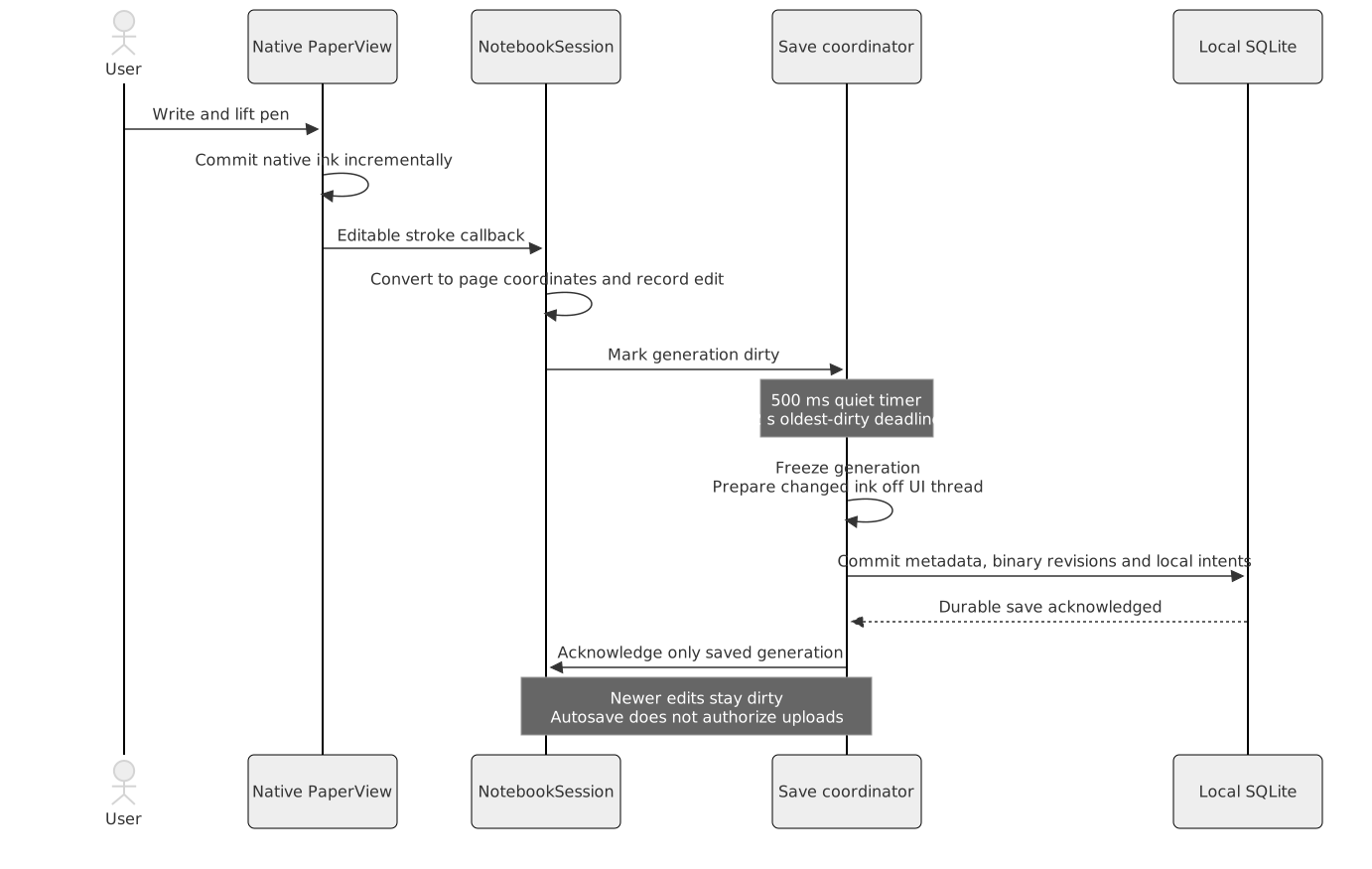
When the user writes a word, g-paper receives pen samples and commits native ink. The app converts the committed stroke from view coordinates to page coordinates, applies page-bound rules, and passes the edit into the notebook session. Ordinary stroke collection updates still have some collection bookkeeping/copying; the implementation does not promise constant-cost editing for arbitrary page sizes.
The session records an edit and marks a new local generation dirty. Undo uses compact edit records where implemented, with exact inverse content. Eraser work is grouped by contact; one completed transform makes one undo step. A remote content generation invalidates stale history rather than letting an older undo snapshot overwrite incoming ink.
When the user erases a line and chooses Undo, the visible line is restored locally as another edit. Subsequent save/sync changes the corresponding current heads; it does not rewind server revision counters. Deleted order anchors remain useful for neighboring strokes. Undo history is finite and is not a permanent backup.
5. Automatic durable local saving
Two timers serve different writing patterns:
-
A 500 ms quiet period coalesces short bursts.
-
The first unsaved edit anchors a 2 s save-attempt deadline, so continuous pen-ups cannot postpone saving forever.
The 2 s value is a scheduling target, not a guaranteed transaction completion time. The acceptance target for completed saves is a dirty age within 5 s under healthy local I/O. OS suspension or failing storage can exceed it; those failures must not be reported as saved ink.
The coordinator serializes saves per notebook. It captures a generation, compares
against the acknowledged snapshot and prepares changed pages off the interaction
thread. InkStorage.prepare() packs changed strokes. Unchanged strokes retain
their revisions and frames; it does not repack all previous ink just to append a
stroke. The current producer repacks an entire changed stroke, so changing one
sample of a very long stroke can still encode multiple frames. Bounded records
do not imply a single-row write for every possible edit.
The local transaction stores page metadata, changed heads/revisions/references, frame BLOBs and durable upload intents together. Only after commit does the coordinator acknowledge that generation. If writing continued during the save, the newer generation stays dirty and receives another save. A successful local save does not itself authorize note upload.
When the user writes continuously with Wi-Fi off, periodic local saves still run. After an acknowledged save, restarting reloads its exact committed ink. An abrupt termination before the next commit can lose the newer unsaved interval; neither the on-screen stroke nor the live-ink plane is proof of disk durability.
5.1. Save failures and memory ownership
Failed saves keep accepted ink and a latched error. New handwriting pauses after the active contact finishes, and Retry attempts durable saving again. Recovery controls such as Undo and Delete remain available; failed ink is not evicted to make a budget look satisfied.
The defaults include an 8 MiB estimated undo budget and 200 commands across the session, a 50-command page ceiling, a 16 MiB/256-entry inactive save cache, and an 88 MiB estimated combined editor budget. The 80 MiB retained target helps trim optional roots before the combined gate. Navigation histories cap at 128 journal entries and 128 meeting return frames. Native coordinate copies and protected operations participate in memory accounting.
These are estimated ownership budgets, not a hard bound on Android PSS, GPU/native allocations or total heap. If evicting persisted reloadable roots is insufficient, new handwriting pauses at a safe contact boundary. Current, unsaved, failed and in-flight content stays owned. A single oversized undo operation can clear that notebook’s history while retaining the accepted edit.
6. Authorizing uploads without coupling them to saving
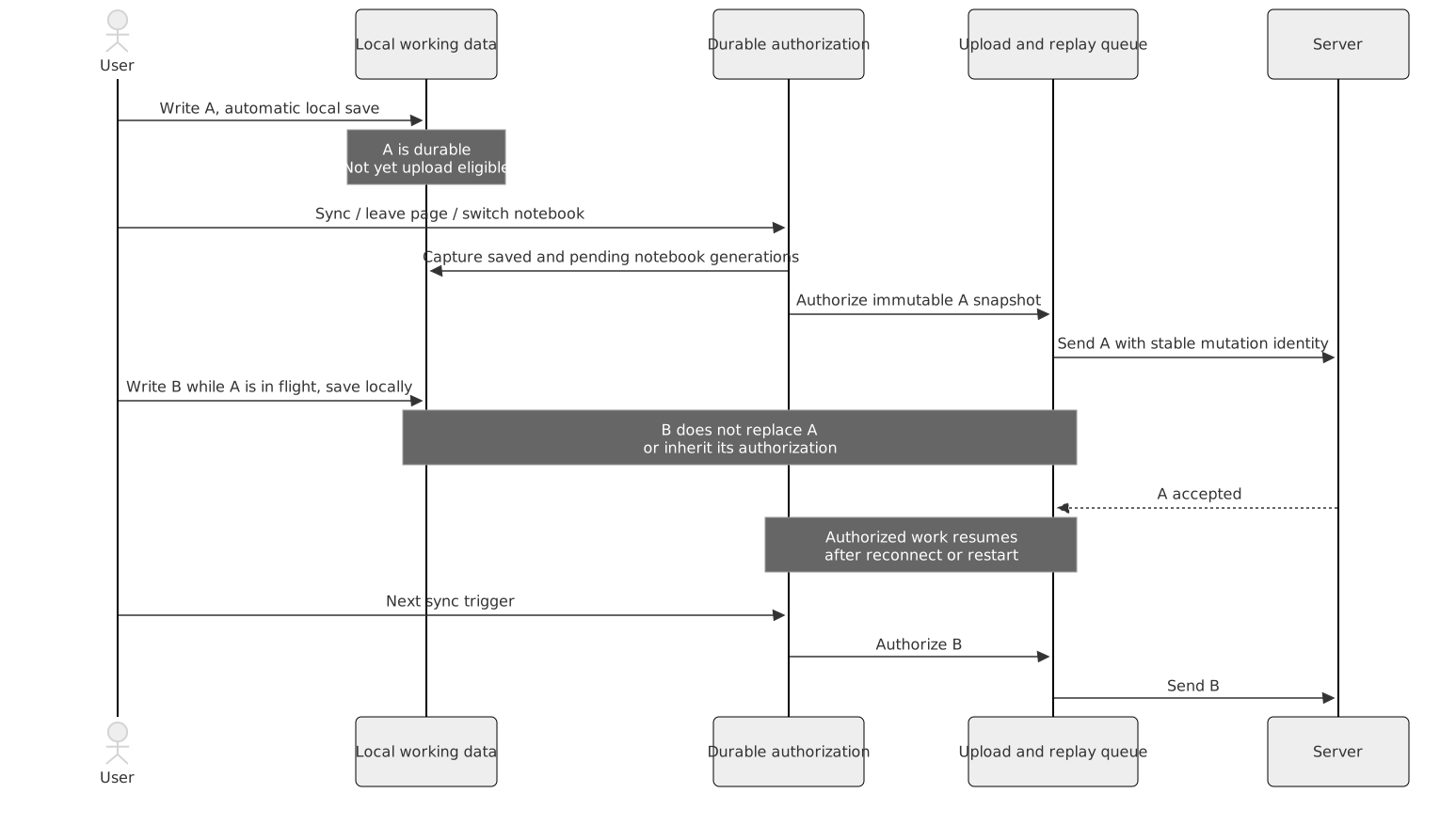
Only these note actions schedule account-wide upload preparation:
-
The user requests Sync.
-
The user leaves a page, including an exit to the overview.
-
The user switches notebooks.
Opening an ordinary modal, a pen-up, an autosave, a debounce expiry or reconnection
is not a new note-upload trigger. Navigation can await its local save to protect
accepted ink, but never awaits network completion. NotebookWorkspace schedules
background preparation in its process scope.
The save coordinator captures pending notebook roots at their selected generations.
Already durable work is authorized in SQLite; each pending triggered save commits
its own authorization atomically with its saved content. sync_authorized_notes
stores metadata drafts/generations, while ink_authorizations stores the immutable
revision and order selected for each stroke. An eligibility flag on the mutable
current head would be insufficient: a later local edit could otherwise replace
the authorized candidate before transport reads it.
When the user saves stroke A, taps Sync, then writes stroke B while the network is busy, A remains the selected candidate and B stays locally durable but untriggered. If the app restarts or reconnects, already-authorized work resumes. B waits for another trigger. Tapping Sync again while A is in flight authorizes newer work without changing A’s immutable retry request.
ToDo handwriting follows this policy after the user presses Save in its editor. An open ToDo draft is not covered by the notebook autosave label. Cancel discards the draft through the existing editor behavior. Standalone text-only ToDo changes and settings still synchronize automatically where parent/content dependencies allow; their behavior was not converted into manual-only synchronization.
7. Upload processing and server transactions

The diagram shows a revision upload. A deletion instead ensures an order anchor and activates a null revision; it has no sample frames to send. Resolution, abandonment and replay-recovery queues have their own bounded control operations.
-
InkOutboxpromotes authorized head snapshots into durable transfers. A transfer pins candidate revision, generation, order and expected remote head. -
The client persists each exact mutation envelope and replay binding before sending it. A transport timeout leaves the identity and bytes intact.
-
DECLAREestablishes a candidate;FRAMEsends bounded bytes;REFERENCEvalidates the next segment;ACTIVATEattempts to make a complete revision current. -
Missing dependencies return
DEFERRED, retaining the same operation for retry. A missing-frame repair can resend exact locally retained frame bytes. -
A successful result advances only the matching in-flight stage/generation. Activation acknowledgment moves to confirmation; it does not mean every device already displays the content.
Acquisition admits at most 32 operations and 512 KiB of prepared work, reserving up to 96 KiB for a newly prepared operation before reading its payload. The HTTP body cap remains 4 MiB; client batches deliberately fit below it, including replay framing. Byte and count admission happen before loading an entire backlog. Newer unsent drafts coalesce; the queue is not simply one immutable page per stroke.
The server authenticates the HTTP request and processes bounded operations in order. Each operation has its own account/session-checked transaction containing replay admission, dependency/head validation, content mutation and terminal outcome. The whole HTTP batch is not one atomic page edit. A connection can fail after some operations commit; exact retry identities recover their outcomes. A partially received stroke revision cannot become visible as complete ink, but separate strokes from one editor gesture can become visible across multiple operations.
Batching reduces HTTP/authentication envelope overhead. It does not automatically reduce SQL commands or the number of per-operation transactions. The measured batch work and retained limits are documented in the trigger-policy report and the capacity report.
8. Receiving, verifying and displaying remote ink
PowerSync replicates the account-scoped publication: SyncRecord, SyncReceipt,
SyncConflict, InkChunk, InkStroke, InkRevision, InkReference and
InkConflict. Authentication/billing records and the private replay ledger are
not part of that content stream.
InkDownload works through live heads and retained conflict candidates, checking
bounded reference batches and recording verified prefixes. Out-of-order delivery
is expected: a head may arrive before its frames. This leaves the new revision
pending while prior usable content remains; it is not permission to display an
empty replacement. Unrelated ready containers can proceed.
Once dependencies are verified, the remote-application owner coordinates the
editing gate and local transaction. InkProjection treats local intents,
transfers and resolutions as protected owners. Incoming server rows cannot simply
overwrite a dirty local head. The active editor is refreshed only at the allowed
editing boundary; input-pause ownership is released even after a failed reload.
Downloaded rows and visible UI can therefore temporarily differ, especially while
a ToDo draft remains open.
When the user draws on BOOX and leaves the page, background upload starts. OP6 receives the server records, verifies the revision, projects it into the working copy and reloads the relevant view. If OP6 is actively editing a protected draft, receipt of the bytes does not force replacement of that draft. Closing/settling the editor permits application through the existing gate.
9. Conflicts, retry identity and reclamation
A timeout is ambiguous: the server might have committed before the response was lost. Retrying an identical mutation returns its existing result. Reusing its ID for different content is invalid. A later user decision is a new operation with its own identity, not a modified retry.
Successful receipts retain compact outcomes instead of historical page payloads. The server’s private installation ledger binds epoch, sequence, mutation ID and request digest. Each installation has at most 256 admitted slots; retirement removes completed outcomes without moving the permanent sequence ceiling backward. Old requests cannot be replayed as new just because their receipt was removed. Epoch expiry/re-entry requires reconciliation of retained outcomes before reissuing proven-uncommitted work. A 90-day epoch is a protocol fence, not a blanket timer for deleting notes or conflict candidates.
When two devices transform the same stroke while offline, both local candidates remain durable. The first valid activation changes the head; the incompatible activation retains a conflict. Review compares against current identities and generations. An explicit local/remote/restore/copy choice retains the required candidate until its resolution is durable and confirmed. A stale dialog must not silently overwrite intervening ink.
Reclamation follows ownership, not just age. Current heads, unresolved conflicts,
pending uploads and supported recovery/copy state pin content. ABANDON identifies
the exact declaration owner being released; a delayed release cannot destroy a
newer declaration. Frame sharing means one unused segment does not make the whole
frame reclaimable. Compact ordering/replay metadata can remain even after payload
collection; zero database-file growth is not an invariant.
10. User-visible state examples
| When the user does X | Y is triggered | What the state means |
|---|---|---|
Writes without navigating |
Session edit, automatic local save, durable intent; no upload authorization |
Saving, then saved locally and awaiting a sync trigger |
Taps Sync while offline |
Save/authorization is persisted; transport cannot finish yet |
Authorized pending work survives restart and can resume on reconnect |
Reconnects after writing without a trigger |
Receiving and previously authorized work can resume |
New untriggered note edits remain local |
Changes page or notebook |
Local save protection, destination loading and background account-wide sync scheduling |
Navigation does not wait for network completion |
Writes while an earlier upload is active |
A new local generation is saved separately |
Its authorization depends on a later trigger |
Receives an edit while an active ToDo draft is open |
Replica verification proceeds; visible application is deferred by the draft gate |
Downloaded does not necessarily mean already visible in that draft |
Restarts after a completed local save |
Working metadata and binary revisions reload from account storage |
The acknowledged saved boundary survives; later unsaved edits are not guaranteed |
Hits a local save error |
Failure remains latched and new handwriting pauses after contact |
Accepted ink stays in memory; Retry/Undo/Delete are recovery controls |
The Sync dialog distinguishes local durability, saved work awaiting a trigger, queued/uploading work, uploaded work awaiting confirmation, and actionable failures. A network connection alone is not “Up to date”. Rejected candidates are not counted as ordinary queued uploads. Estimates can grow as bounded envelopes are prepared.
11. Known implementation gaps and evidence boundaries
The following implementation issues remain unresolved:
-
Rejected non-conflict transfers:
InkOutboxretainsREAD_ONLYand other terminal rejections inERROR, whileInkResolutionslists conflict-backed rows. Renewing access and pressing Sync is not currently a general recovery path for that candidate or subsequent edits to the same head. Recovery needs explicit candidate preservation and a fresh operation identity. Retention is not the same as user-accessible recovery. -
Meeting metadata operations:
relink(),refreshSnapshot()anddelete()still use an ink-loading helper by default. A meeting whose individually valid pages exceed the aggregate 64 MiB full-load limit can fail these metadata operations. The intended header-only residency boundary is not consistently applied there. -
ToDo overview limits: the overview reader rejects more than 4,096 tasks or 8 MiB of aggregate metadata, while writes/remote projection can still admit that saved collection. This can make the entire overview unavailable after restart. The current read rejection is not a recoverable pagination policy.
Source inspection, host tests and physical-device observations provide different kinds of evidence. A successful build or automated navigation test does not establish physical BOOX stylus/live-ink correctness. Recovery, responsiveness and capacity claims require measurements appropriate to the behavior being assessed. The linked validation reports record measured results and their limitations.
12. Architecture decision records
See the ADR section for the decisions and their consequences.
13. Source and contract map
| Concern | Entry points |
|---|---|
Account and jobs |
|
Editing and display |
|
Saving and local ink |
NotebookSaveCoordinator.kt, SqliteNotebookRepository.kt, InkStorage.kt |
Trigger and upload |
SyncUploadAuthorization.kt, InkOutbox.kt, AccountSync.kt, ink-upload.ts |
Reception and resolution |
|
Wire contracts |
|
Measured behavior |
Save/sync scenarios, Memory budgets, Storage accounting, Acceptance matrix |
Protocol documents define binary fields and wire behavior. Use implementation source and validation reports to assess integration status; a protocol definition alone does not establish that every required behavior has been verified.